Turn messy PDFs and files into structured data - offline.
VadeKit runs OCR on your CPU, drops every table it finds into a spreadsheet, and hands you SQL, charts and reports over the result. 32 tools, one window, nothing leaves your machine.
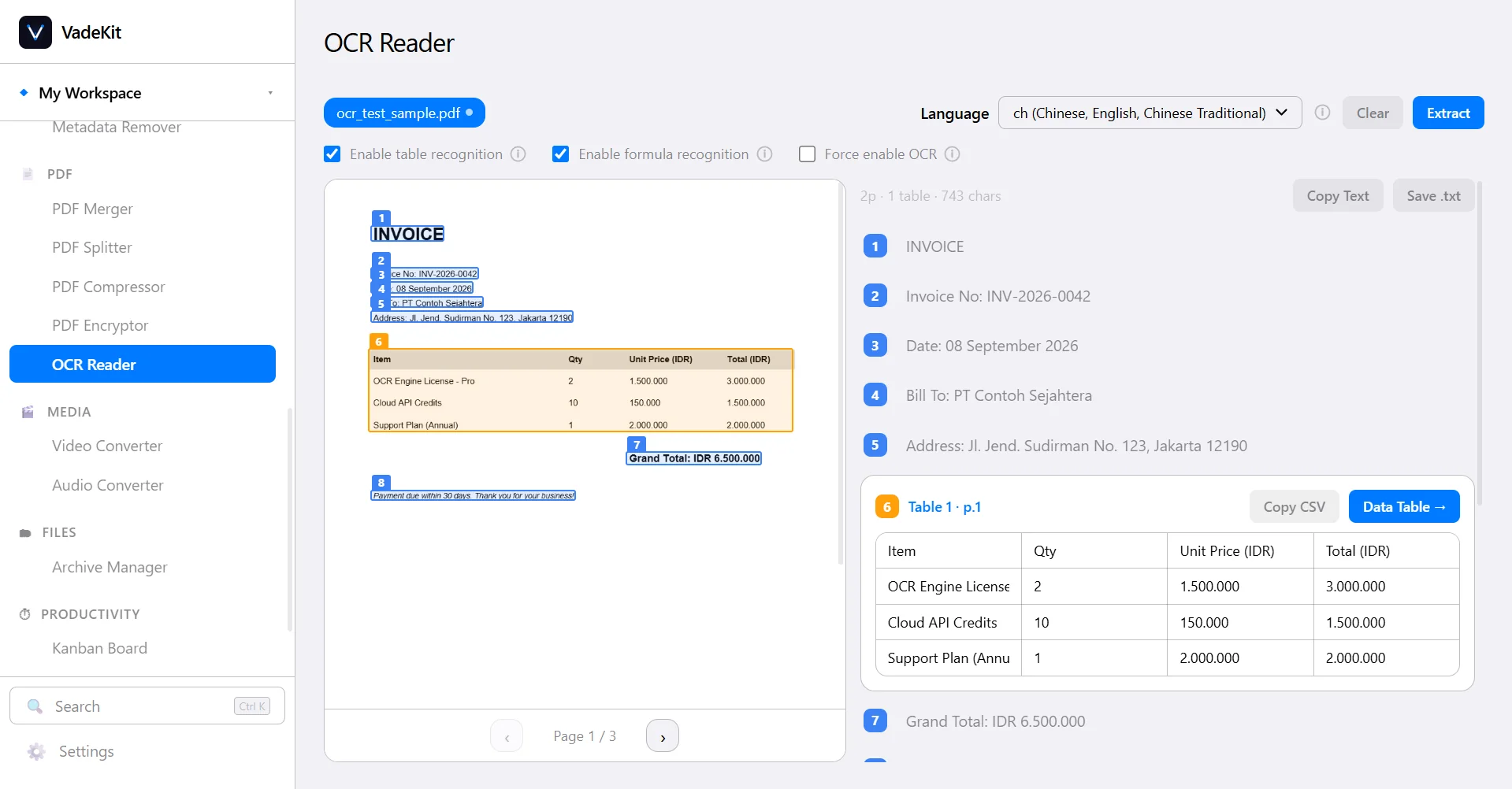
VadeKit reads layout, text and tables on your CPU. Every detected table becomes an editable Data Table.
Drop a PDF, get a report. The first run needs no documentation.
From the intent screen, pick “Extract tables & insights from PDF” and drop a file. This is the whole flow it runs, start to finish, on your machine.
- Step 1
Drop a PDF
Open VadeKit to
What do you want to do?, pick the PDF card, and drop a file or an invoice. - Step 2
OCR & Extract
VadeKit parses layout, reading order, text and tables on your CPU. The setup models download once on first use; after that it is fully offline.
- Step 3
Data Table
Detected tables open in the CSV Editor as an editable Data Table. Column Overview shows type, unique %, empty % and min/max/avg per column.
- Step 4
Export Report
Generate Reportopens the Report Builder pre-populated. Choose a theme, add a chart with the axes you pick, and export to PDF, HTML or Word.
Designed to run drop-to-PDF in about ten minutes on a first attempt.
Once the table exists, the rest of the bench is already open.
A few of the tools that do the heavy lifting after extraction.
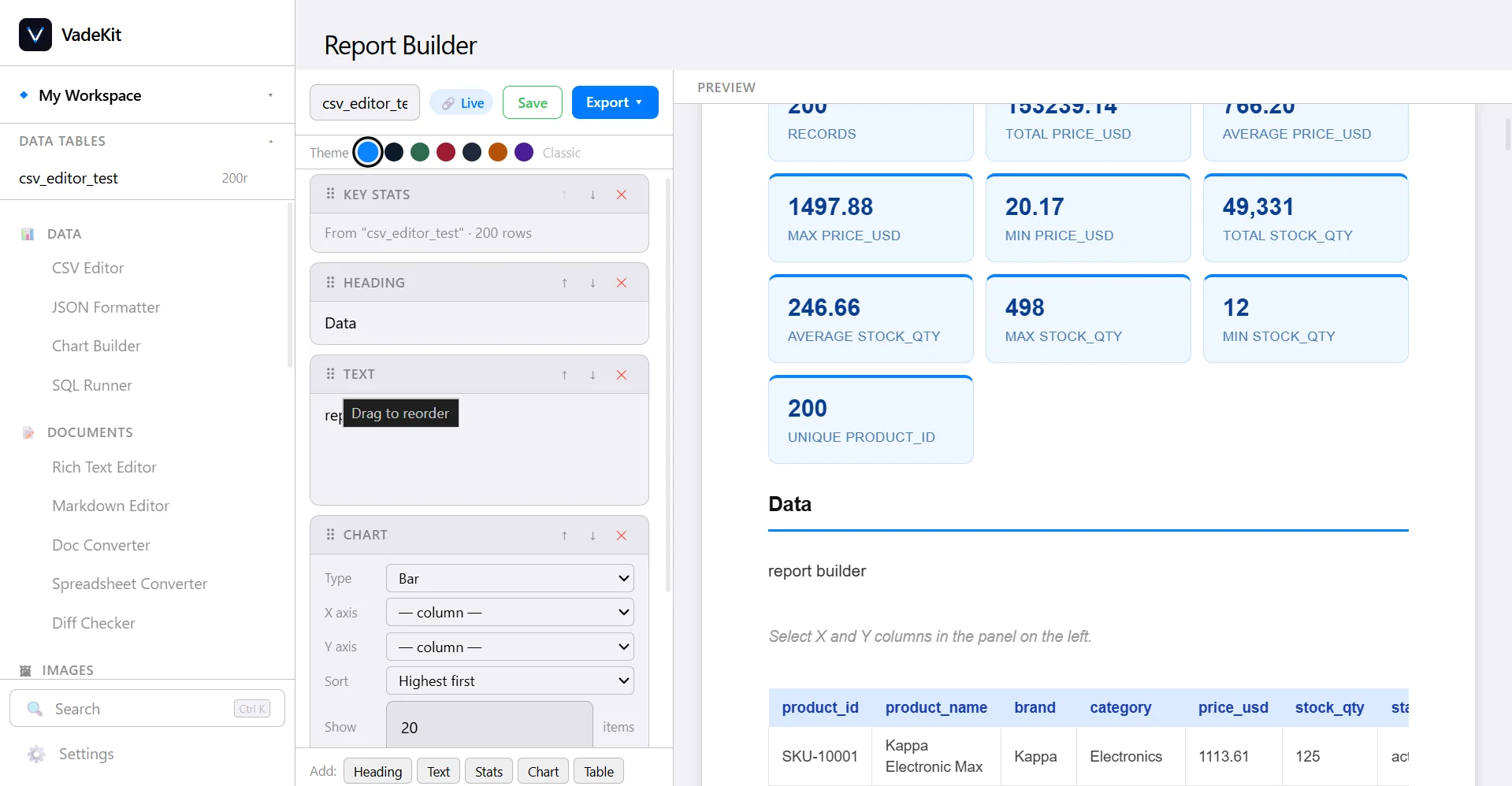
Extracted rows land in a real spreadsheet.
Detected tables open in an AG Grid spreadsheet: sort, filter and add formulas, then hit Generate Report. Column Overview shows type, unique %, empty % and min/max/avg per column; Save to Workspace keeps it.
- Spreadsheet grid
- Formulas · Find & Replace
- Column Overview stats
- Generate Report →
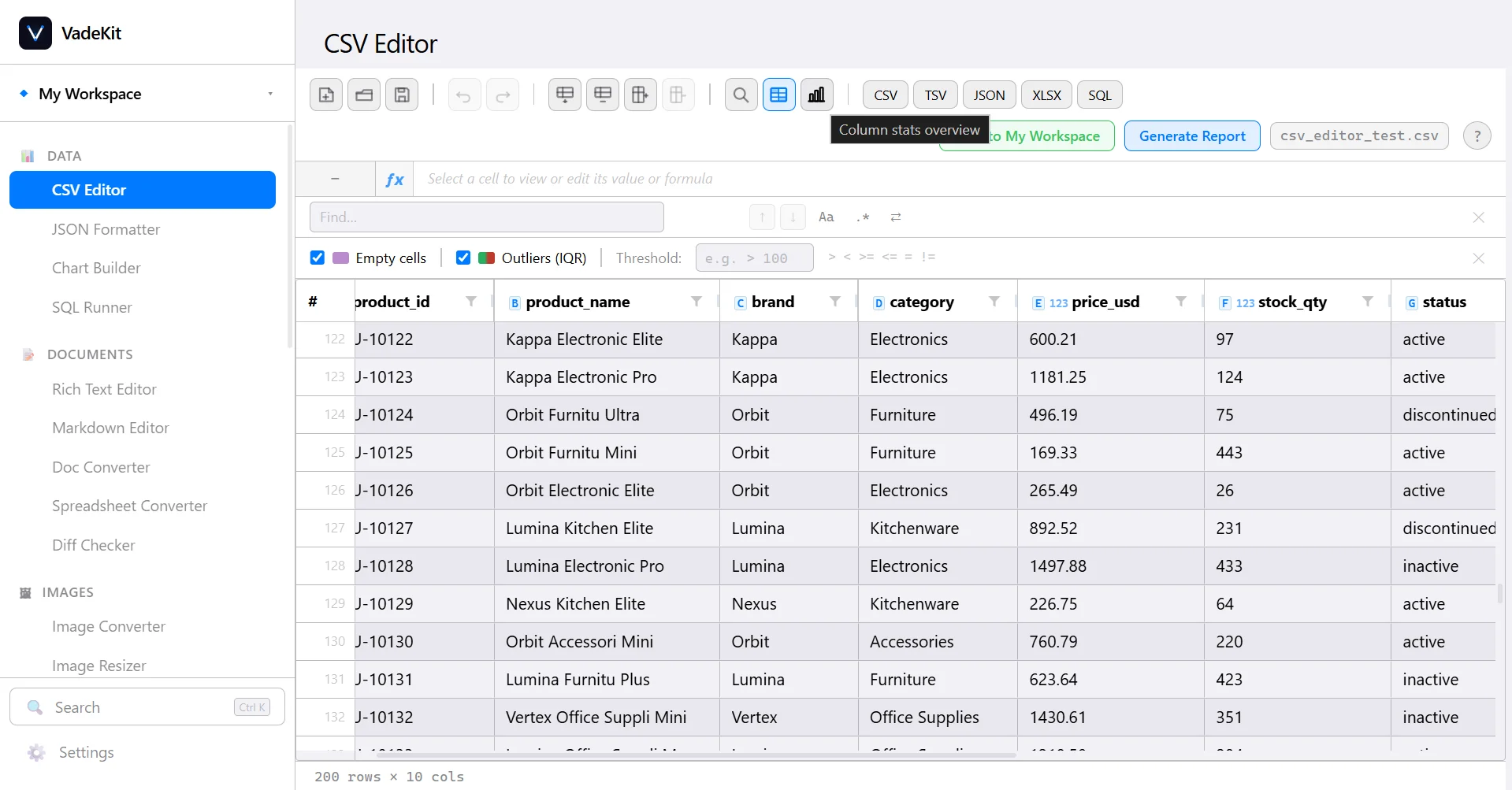
SQL across your files, offline.
File mode loads CSV / JSON / XLSX into an in-app SQL engine; workspace tables load automatically, so you JOIN across files without re-importing. Server mode connects to live PostgreSQL, MySQL and MSSQL databases.
- Offline SQL engine
- Postgres · MySQL · MSSQL
- Format · Explain · ER · Pivot
- Snapshot → Data Table
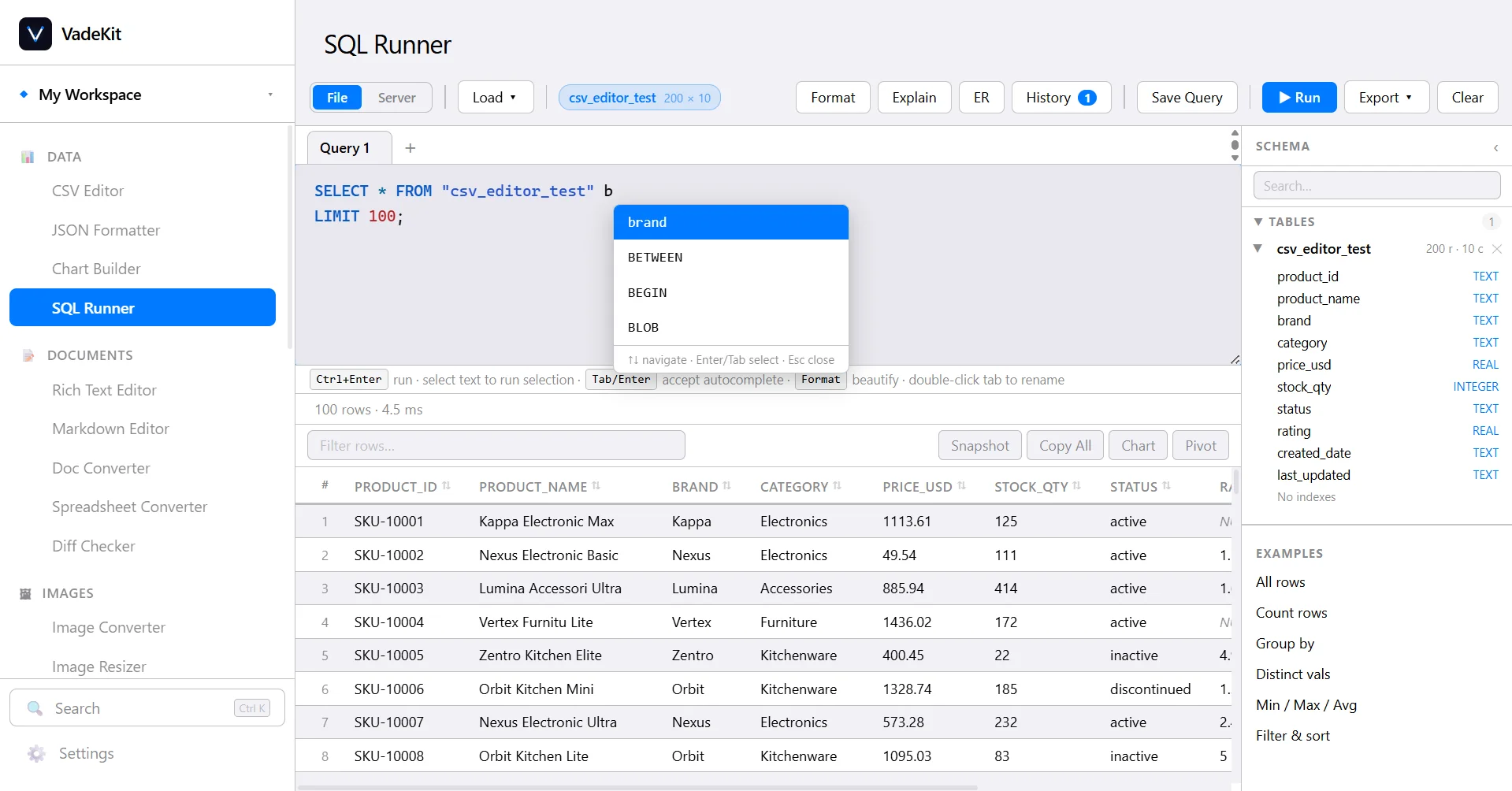
Turn the data into a themed, live report.
A split editor / preview with Heading, Text, Stats, Table and Chart sections you drag to reorder. Seven themes with gradient banners, themed table headers and stat cards. Save a report against a workspace Data Table and it stays live - reopen it later and it flags when the source data has changed. Export to PDF, HTML or Word.
- 7 themes
- Auto key-stats
- Live data binding
- PDF · HTML · Word
Your files never reach a server, because there is no server.
VadeKit reads from your disk and writes back to it. The processing engines ship inside the installer.
Every processing engine runs as a local process on your own machine. Nothing is uploaded, and there is no telemetry.
Your workspaces live in plain SQLite and standard file formats on your disk. Export any Data Table or report and open it elsewhere. Nothing is trapped.
"Find insights" is arithmetic: counts, shares of total, min / max / average. No large language model and no external AI service; anything that runs, runs on your device.
Organised by what you’re working on, not which library powers it.
Pick an area to see the tools inside it. Every one runs on your machine, and every one is a keystroke away in the command palette: ⌘K on macOS, Ctrl K elsewhere.
Everything that happens after a table exists.
CSV Editor
Extracted rows open in a real spreadsheet grid: sort, filter, Excel-style formulas, then Generate Report. Column Overview gives per-column type, unique %, empty % and min/max/avg.
- CSV Editor
- SQL Runner
- Report Builder
- Chart Builder
- JSON Formatter
- Rich Text Editor
- Markdown Editor
- Doc Converter
- Spreadsheet Converter
- Diff Checker
- Image Converter
- Image Resizer
- Image Compressor
- Background Remover
- Watermark Tool
- Metadata Remover
- OCR Reader
- PDF Merger
- PDF Splitter
- PDF Compressor
- PDF Encryptor
- PDF Watermark
- Video Converter
- Audio Converter
- Archive Manager
- Kanban Board
- Pomodoro Timer
- Gantt Chart
- QR & Barcode
- Word Counter
- Timezone Converter
- Flow Builder
Data
- CSV Editor - Extracted rows open in a real spreadsheet grid: sort, filter, Excel-style formulas, then Generate Report. Column Overview gives per-column type, unique %, empty % and min/max/avg.
- SQL Runner - Run SQL across your CSV, JSON and XLSX files with an in-app engine - workspace tables load themselves, so you JOIN without re-importing. Server mode connects to live PostgreSQL, MySQL and SQL Server.
- Report Builder - A split editor and live preview with Heading, Text, Stats, Table and Chart blocks you drag to reorder. Seven themes, auto key-stats, live data binding to a workspace Data Table, and export to PDF, HTML or Word.
- Chart Builder - Point at a Data Table, choose the axes, sort and limit, pick a chart type, and export the result as PNG or SVG.
- JSON Formatter - Pretty-print, minify and validate JSON, walk it as a collapsible tree, and flip a nested array into a flat table.
Documents
- Rich Text Editor - A clean WYSIWYG editor with styles, lists, tables and images. Exports to HTML and DOCX.
- Markdown Editor - Split-pane Markdown with live preview, a document outline and one-key export.
- Doc Converter - Convert DOCX, ODT, RTF and more to PDF or plain text with headless LibreOffice - layout intact.
- Spreadsheet Converter - Move a file between XLSX, CSV, TSV, ODS and JSON without opening Excel.
- Diff Checker - Compare two files or two pasted snippets line by line, with word-level highlighting.
Images
- Image Converter - Batch-convert between PNG, JPEG, WebP, AVIF and TIFF.
- Image Resizer - Resize or crop many images at once - by pixels or percent - keeping the aspect ratio.
- Image Compressor - Shrink file size with a visible quality slider and a side-by-side before/after.
- Background Remover - Cut the subject out of a photo with a model that runs on your machine - nothing is uploaded.
- Watermark Tool - Stamp text or a logo across a batch of images, with control over position, scale and opacity.
- Metadata Remover - Strip EXIF, GPS and camera metadata from images before you send them anywhere - one photo or a whole batch.
- OCR Reader - Read layout, reading order, text and tables from scanned or digital PDFs on your CPU. Every detected table becomes an editable Data Table.
- PDF Merger - Combine PDFs and reorder pages with drag and drop.
- PDF Splitter - Split by page range or into equal-sized chunks of pages.
- PDF Compressor - Downsample embedded images and clean up the file structure to cut its size - one PDF or a whole batch at once.
- PDF Encryptor - Add or remove a password, with qpdf - one PDF or a whole batch at once.
- PDF Watermark - Stamp a text or logo watermark onto every page, one PDF or a whole batch at once.
Media
- Video Converter - Transcode between MP4, WebM, MOV and more, with trim, resolution and bitrate controls.
- Audio Converter - Convert between MP3, WAV, FLAC, AAC and OGG, or pull the audio track out of a video.
Files
- Archive Manager - Create and extract ZIP, TAR and gzip archives, with a preview of what is inside before you unpack.
Productivity
- Kanban Board - A Trello-style board with cross-column drag-and-drop, due dates, labels, checklists, file attachments, per-card comments and an activity log.
- Pomodoro Timer - A focus timer that keeps counting even when minimized, with a task list to attribute sessions to, selectable alarm sounds, and a completed-sessions chart.
- Gantt Chart - Drag to move or resize tasks, draw real dependency arrows, collapse parent/child groups, color-code bars, and export the whole timeline to PNG or PDF.
Quick tools
- QR & Barcode - Generate QR codes and common barcode formats, with color and size controls. Try the free QR code generator
- Word Counter - Live word, character, sentence and reading-time counts as you type or paste. Try the free word counter
- Timezone Converter - A live clock across every city you add, a day/night timeline per row, and search by city name - including ones that share a bigger city’s timezone.
- Flow Builder - Chain steps - OCR a document, filter rows, save a Data Table, generate a report - into a visual pipeline you can save, reload and re-run. Drag-connect nodes, step-by-step run status, and a debug view of each step’s output.
Is it really offline, is there a subscription, does it use AI?
Short answer to all three: yes, no, no. The rest below.
Does VadeKit work offline?
Yes. Every processing engine runs locally on your machine. The only network calls VadeKit makes are one-time licence activation, update checks, and a one-time download of the OCR models the first time you use the OCR Reader. Your files are never uploaded and there is no telemetry.
Does VadeKit use AI, ChatGPT or any cloud service?
No. There is no large language model and no external AI API. "Find insights" is arithmetic: counts, shares of a total, and min / max / average, computed on your device. OCR and background removal use local models that ship with or download once into the app.
Is VadeKit a subscription?
No. VadeKit is a one-time purchase of $24, all taxes included. The licence is perpetual, covers one device, and includes every VadeKit 1.x update at no extra cost.
Which operating systems does VadeKit support?
Windows, macOS (Apple Silicon) and Linux, from a single purchase. The same 32 tools are available on all three.
What can the OCR Reader do?
It reads scanned or digital PDFs and images on your CPU, extracts the text, page layout and tables, and turns each detected table into an editable spreadsheet. From there you can clean the data, run formulas or SQL on it, chart it, and generate a PDF report.
Where is my data stored, and can I get it out again?
On your own disk. Workspaces are plain SQLite files; every Data Table and report exports to standard formats (CSV, JSON, XLSX, PDF, HTML, Word). Nothing is locked to VadeKit.
Can I move my licence to another computer?
Yes. Deactivate the licence on the old device from Settings, then paste the key on the new one. The activation is bound to a device fingerprint, not to an account - there is no login.
How many tools are included?
32 tools across eight areas: Data, Documents, Images, PDF, Media, Files, Productivity and Quick Tools (including Flow Builder) - all in one installer, all working offline once licensed.
$24 once. Then it is just yours.
No subscription, no seat count, no upsell. Buy it, own it, keep every 1.x update.
- All 32 tools: OCR, spreadsheets, SQL, charts, reports
- Free updates for the life of VadeKit 1.x
- Windows, macOS & Linux
- Works fully offline: no account, no telemetry
- Licensed for one device, movable anytime
Secure checkout by Dodo Payments. The price shown is the total - all taxes included. Your download link and licence key are emailed the moment payment clears.
After purchase you install VadeKit and paste your licence key on first launch. The OCR models download once on first use; every other engine is in the installer. Windows may show a SmartScreen notice; click More info → Run anyway.